Free · iPhone, Android, Chrome, Edge, Firefox, Word & desktop

Fix your writing everywhere you type.

GemType is a free, open-source Grammarly alternative. It underlines mistakes on any website, inside Microsoft Word, and — with the desktop app — in any application on your computer, then fixes them in one click. Powered by your own free Google Gemini key: no account, no subscription, no tracking.

GemType is on iPhone and AndroidA grammar checker keyboard for any app on your phone.
Open source No account, no tracking Any language
Features

Everything Grammarly charges for.
Free, private, and open.

Live checking, anywhere

Wavy underlines appear a second after you stop typing — in Gmail, LinkedIn, X, Reddit, and every normal text field on the web.

One-click fixes

Click an underline, accept the correction. Ctrl/Cmd+Z always undoes — and every accepted fix re-checks the whole sentence automatically.

Rewrite on demand

Select any text for a floating toolbar: Improve, Fix, Shorten, Formal, or Casual. Rewrites keep your meaning — corrections keep your wording.

Any language

Auto-detects what you're writing — English, Spanish, Bengali, Arabic, Japanese, and anything else Gemini understands.

Private by design

Your text goes straight from your browser to Google's Gemini API with your key. No middleman server, no analytics, and password fields are never read.

Your own free key

Runs on a free Gemini API key from Google AI Studio — two clicks, no credit card. The free tier comfortably covers daily writing.

Android app · Now on Google Play

GemType for Android: an AI grammar checker keyboard

GemType for Android checks and corrects your writing right where you type it — in messages, email, notes, social apps and the browser — explains every fix, and rewrites your text in one tap. It is a full keyboard with 31 languages, and it sends text only to Google's Gemini API with your own key. There are no GemType servers, no ads and no analytics.

Free · Android 5.0 and newerOpen source · no account · no ads
PlatformAndroid 5.0 and newer
Get itGoogle Play · APK on GitHub
Version1.0.0
PriceFree, no ads. Uses your own free Gemini API key
Languages31 languages, 96 layouts, 21 scripts
Packageorg.matily.gemtype
LicenseAGPL-3.0-or-later · source on GitHub
iPhoneApp Store · GemType for iPhone
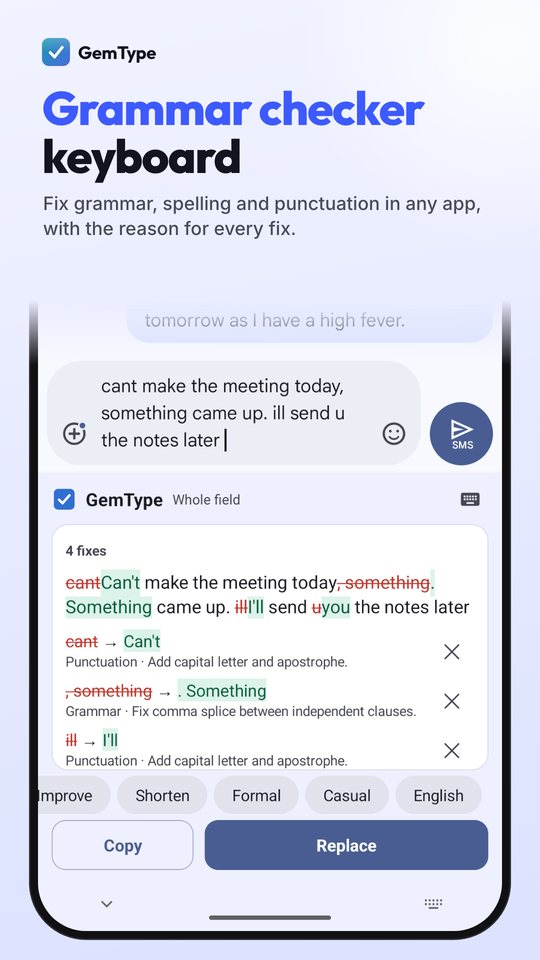
GemType grammar checker keyboard on Android showing a list of fixes, each with a reason

Grammar checker keyboard

A list of fixes, each marked grammar, spelling, punctuation or style, with a short reason. Keep the ones you want, then tap Replace.

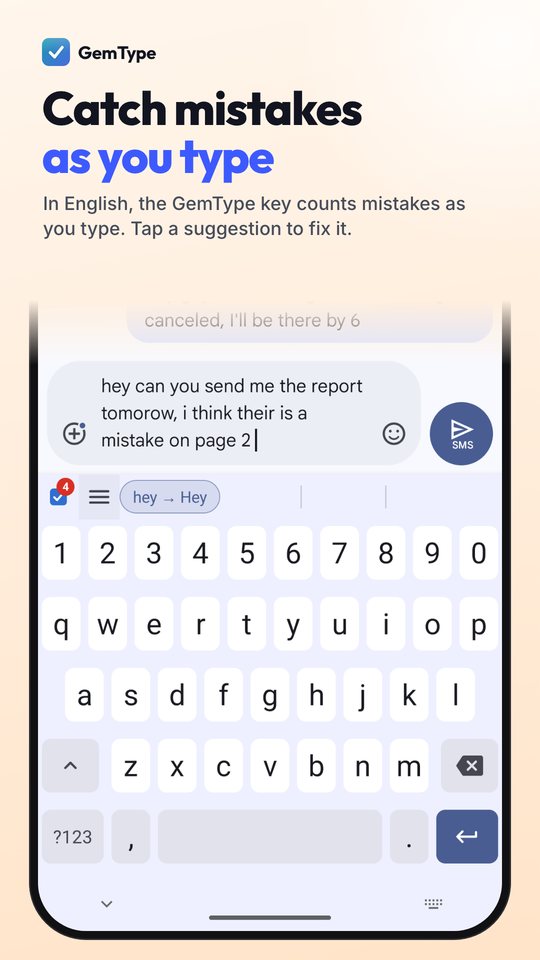
GemType Android keyboard counting mistakes as you type and suggesting a one-tap fix

Catch mistakes as you type

In English, the GemType key counts mistakes after you pause. Tap the suggestion to apply a fix. It is off until you turn it on.

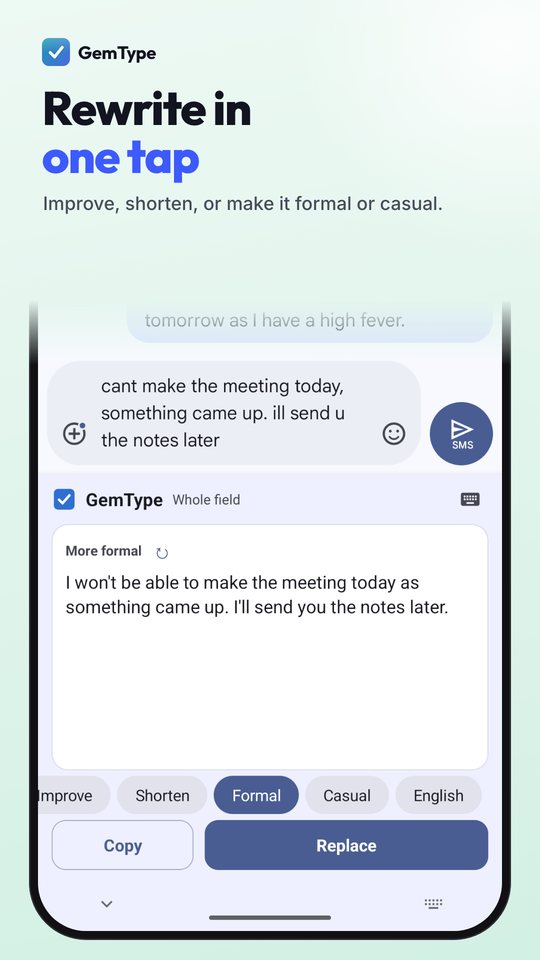
GemType Android keyboard rewriting a casual note as a formal message

Rewrite in one tap

Improve, Shorten, Formal or Casual, with another version one tap away. Here a casual note becomes a formal message.

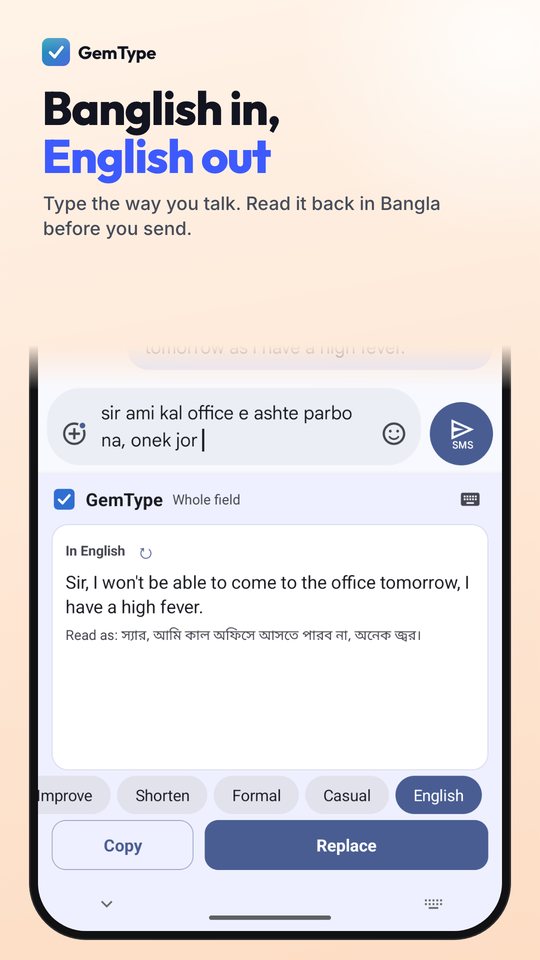
Banglish typed in English letters turned into clear English with a Bangla read-back

Banglish in, English out

Type the way you talk, then translate to clear English. A Read as line shows the meaning back in Bangla before you send.

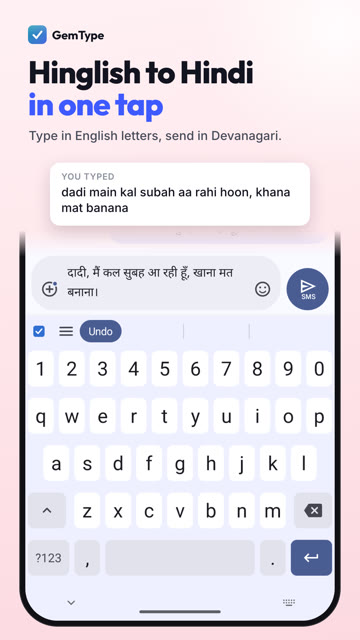
Hinglish typed in English letters converted to Hindi in Devanagari on the GemType Android keyboard

Hinglish to Hindi in one tap

Type Hindi in English letters and convert it to Devanagari script with one tap.

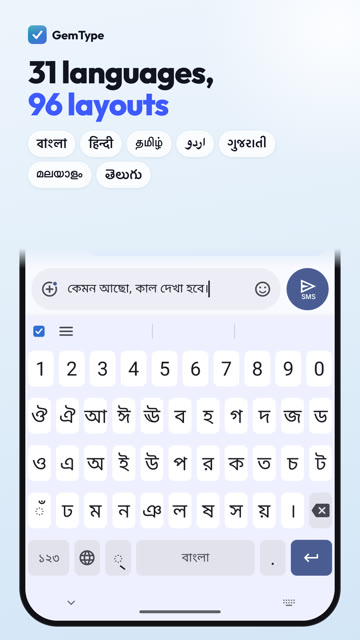
The GemType Bangla keyboard layout, one of 96 layouts in 31 languages

31 languages, 96 layouts

Bangla, Hindi, Tamil, Telugu, Arabic and more, with gesture typing, next-word prediction and predictive transliteration.

What the Android keyboard does

Grammar checker in every app

Tap the GemType key to check what you wrote in messages, email, notes, social apps and the browser. Every fix is explained, undo is one tap away.

Rewrite in one tap

Improve, Shorten, Formal or Casual. Ask for another version and compare them before you replace your text.

Type the way you talk

Write Bangla, Hindi and other languages in English letters (Banglish, Hinglish) and convert to the language's own script. Translate to clear English with a read-back.

A full keyboard in 31 languages

96 layouts in 21 scripts, gesture typing, next-word prediction in 20 languages, predictive transliteration, clipboard history, themes and emoji search.

Fix text from other apps

Select text in many apps and choose GemType from the menu, share text to GemType, or use the Fix clipboard tile in Quick Settings.

Private by design

No GemType servers, no ads, no analytics, no accounts. Text goes straight to Google's Gemini API with your own key, which is stored encrypted on your device.

Get started in three steps

Install GemType

From Google Play, or download the APK from GitHub Releases.

Turn it on

Open GemType and follow the setup: enable it as a keyboard, then switch to it.

Paste your free key

Get a free Gemini API key at aistudio.google.com/apikey and paste it into GemType.

Then start typing in any app and tap the GemType key. Free Gemini keys have per-minute and daily limits: if fixes stop for a while, wait a minute, switch the model to Flash-Lite in GemType settings, or turn on billing for your key in Google AI Studio.

31 languages

ArabicAssameseBangla (Bengali)BhojpuriBurmeseEnglishGujaratiHindiHoKannadaKashmiriKonkaniMaithiliMalayalamManipuri (Meitei)MarathiMonNepaliOdiaPunjabiRohingyaSanskritSantaliSaurashtraSindhiSinhalaSylhetiTamilTeluguTuluUrdu

Check as you type works in English. Tapping GemType fixes and rewrites text in many languages, including Bangla and Hindi.

iPhone app · Now on the App Store

GemType for iPhone: an AI grammar checker keyboard

GemType for iPhone checks and corrects your writing right where you type it, in messages, email, notes, social apps and the browser. It shows the reason for every fix and rewrites your text in one tap. It is a full keyboard with 29 languages, and it sends text only to Google's Gemini API with your own key. There are no GemType servers, no ads and no analytics.

Free · iOS 16 or laterNo account · no ads · your own Gemini key
Download on the App Store
PlatformiPhone, iOS 16.0 or later
Get itApp Store
Version1.0.0
PriceFree, no ads. Uses your own free Gemini API key
Languages29 languages, 64 layouts
PrivacyiPhone privacy policy
AndroidGoogle Play
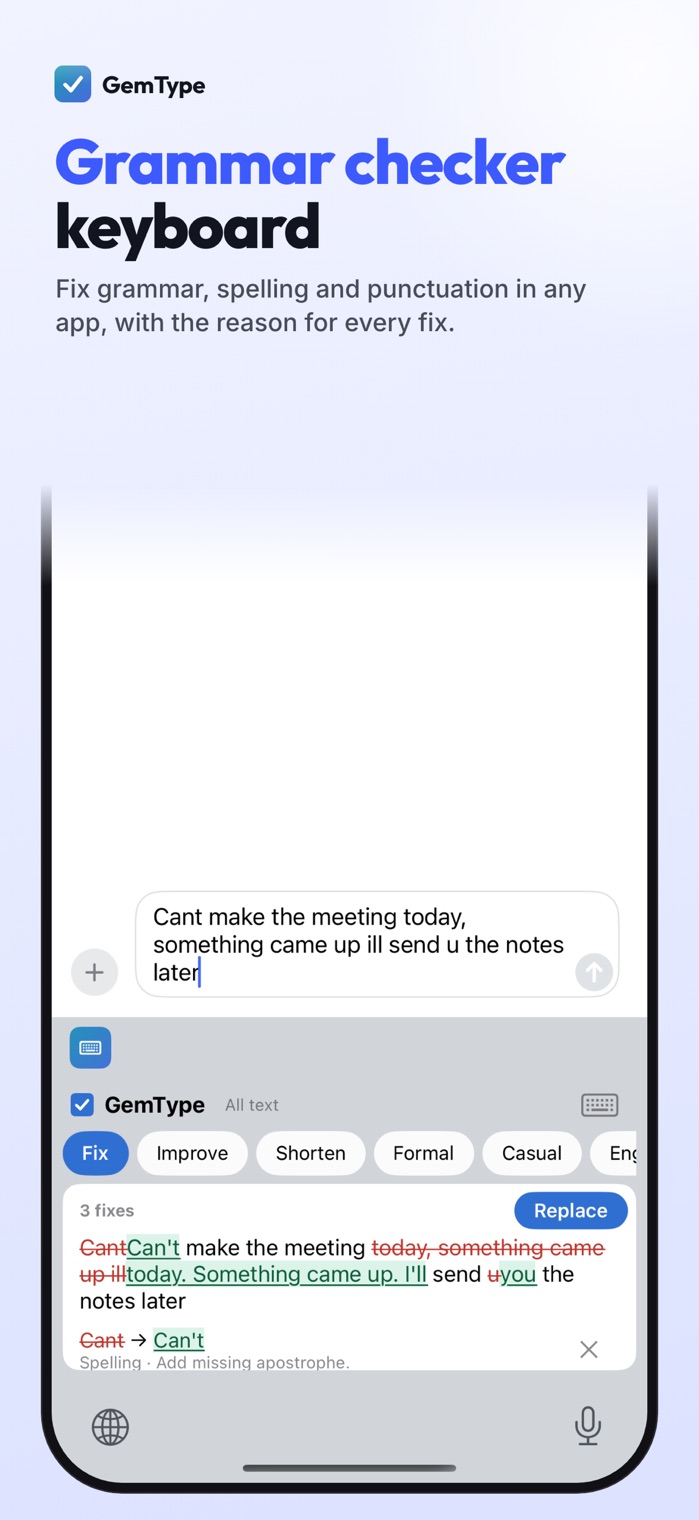
GemType grammar checker keyboard on iPhone showing three fixes in a message, with Replace

Grammar checker keyboard

Fix grammar, spelling and punctuation in any app, with the reason for every fix. Keep the fixes you want, skip the rest, then tap Replace.

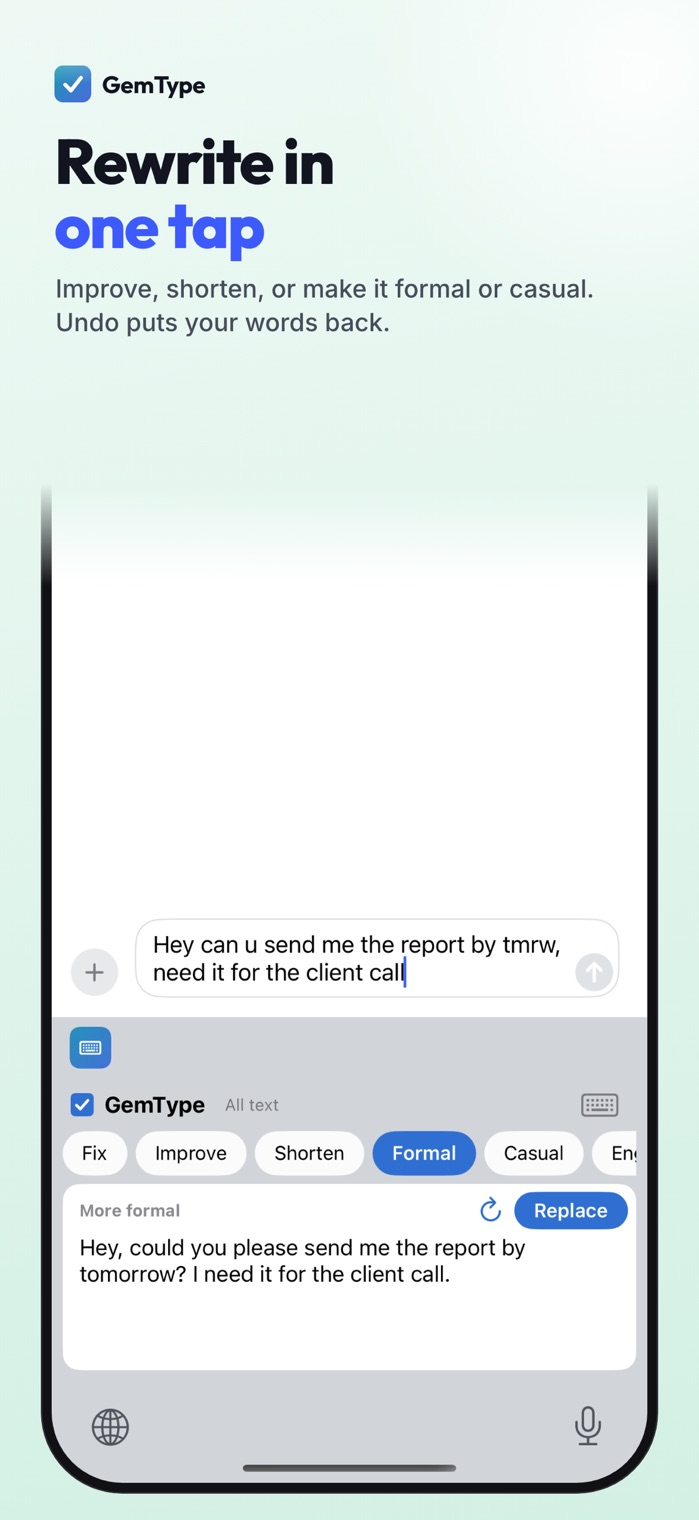
GemType iPhone keyboard rewriting a rushed message as a more formal one

Rewrite in one tap

Improve, Shorten, Formal or Casual, with another version one tap away. Undo puts your words back. Here a rushed note becomes a polite request.

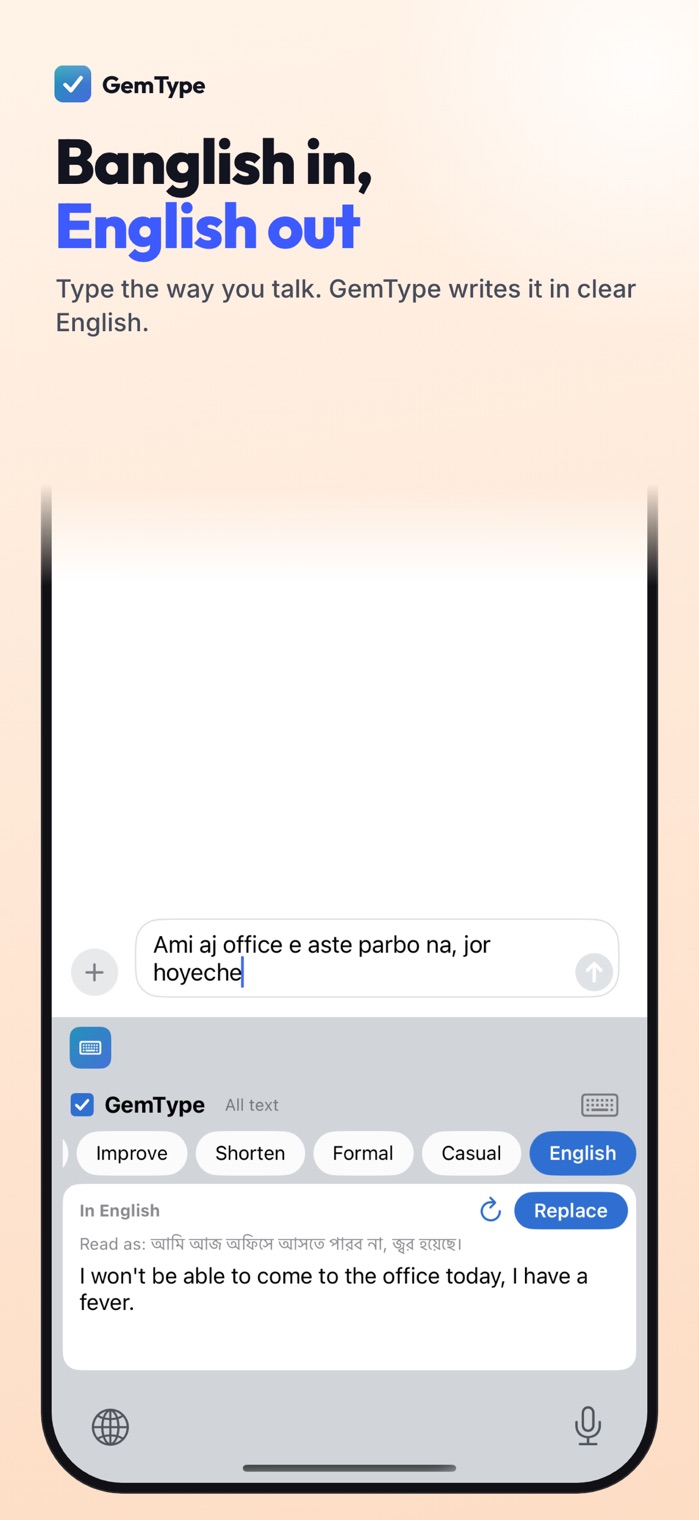
Banglish typed in English letters turned into clear English with a Bangla read-back on the GemType iPhone keyboard

Banglish in, English out

Type the way you talk, then translate to clear English. A Read as line shows how GemType understood your words, in Bangla, before you send.

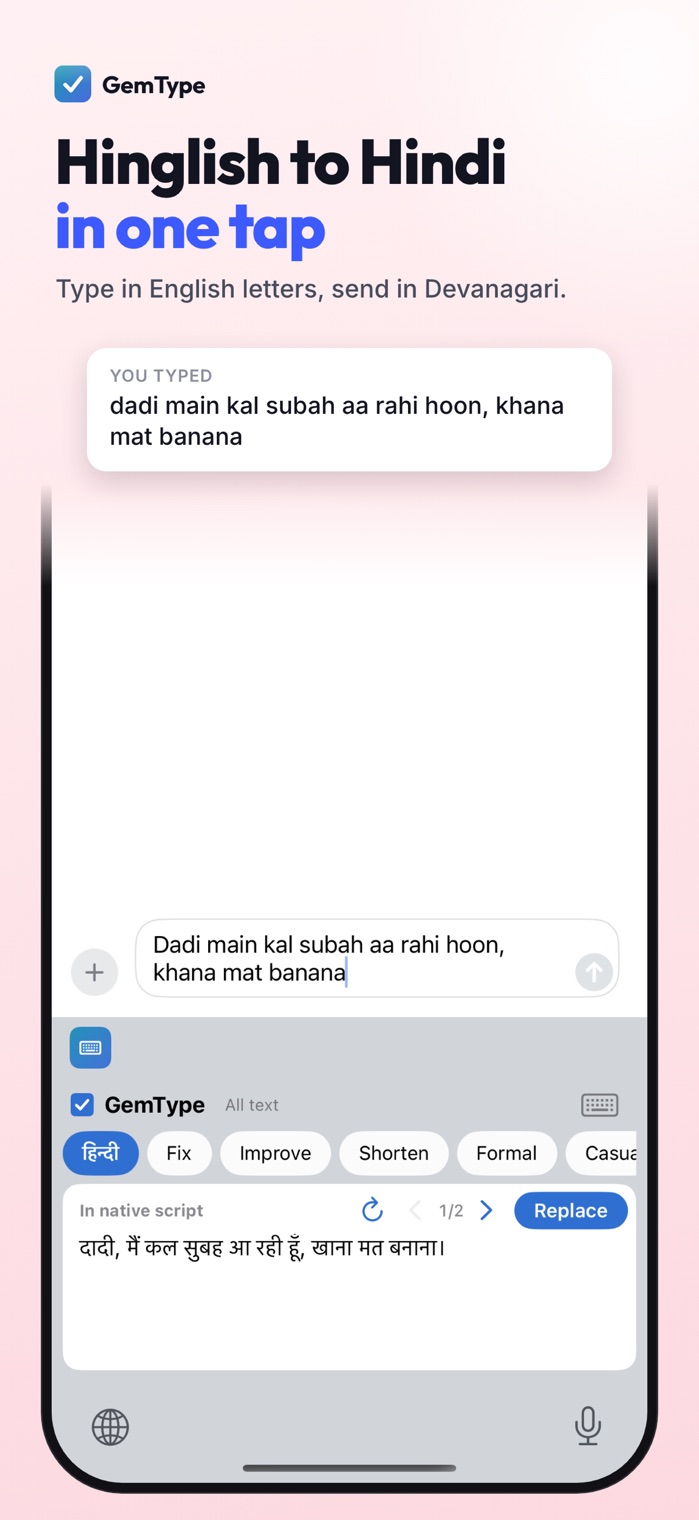
Hinglish typed in English letters converted to Hindi in Devanagari on the GemType iPhone keyboard

Hinglish to Hindi in one tap

Type Hindi in English letters and convert it to Devanagari script with one tap.

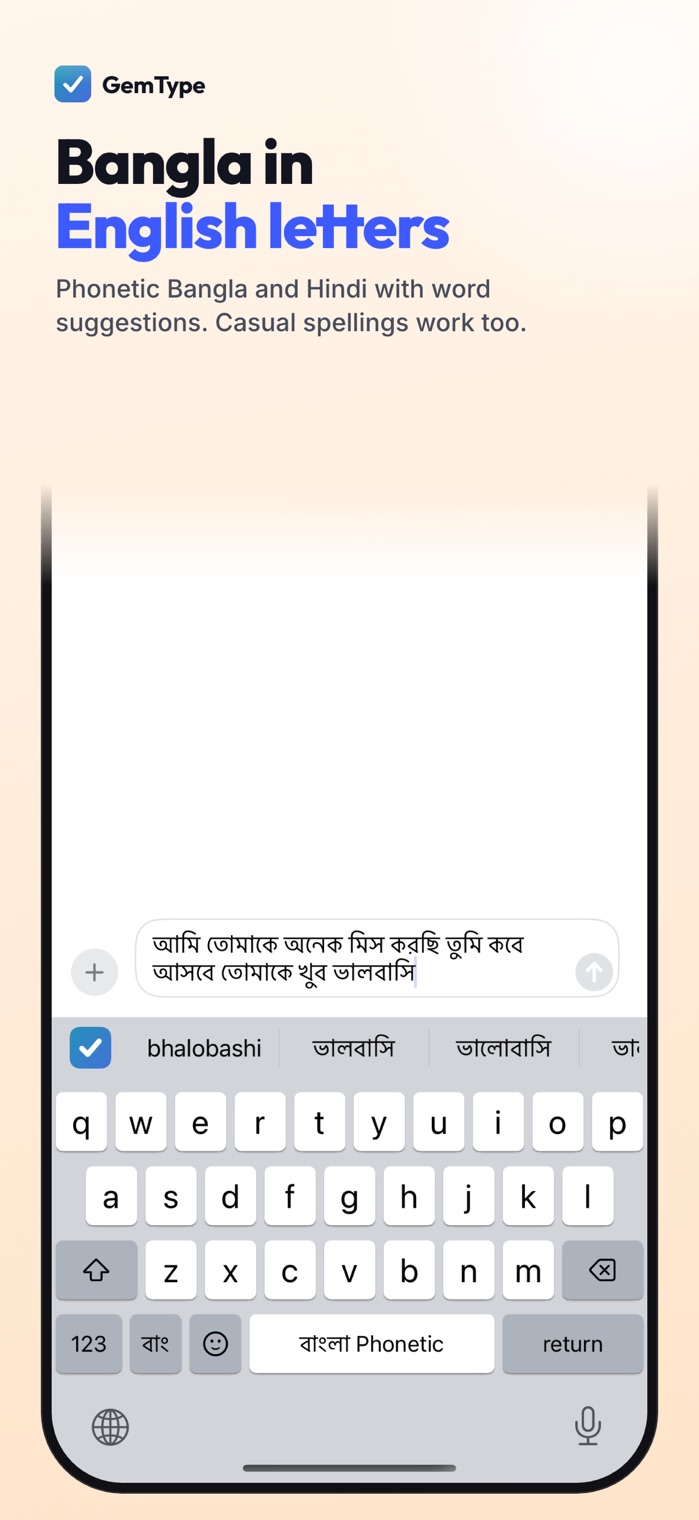
The GemType phonetic Bangla keyboard on iPhone turning bhalobashi into Bangla script with word suggestions

Bangla in English letters

Phonetic Bangla and Hindi keyboards turn English letters into the language's own script, with word suggestions. Casual spellings work too.

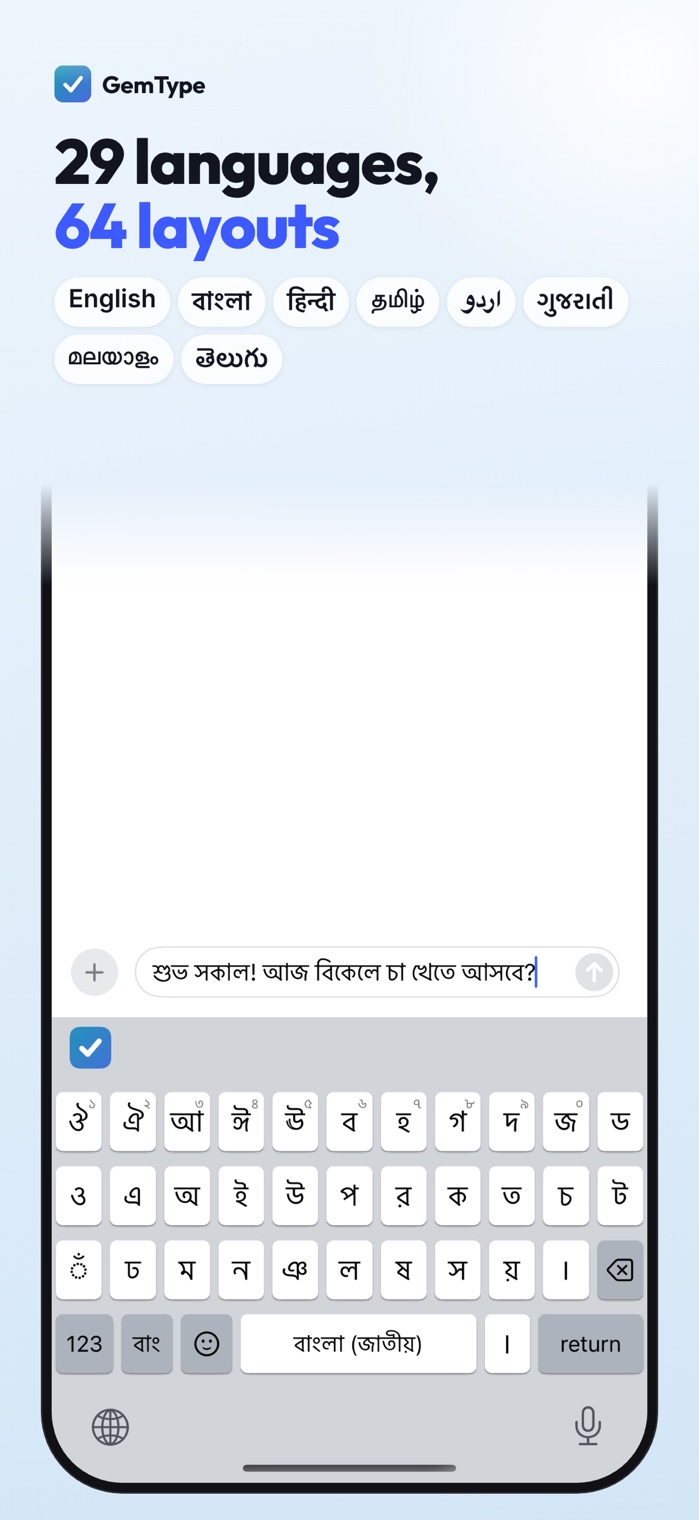
The GemType Bangla keyboard layout on iPhone, one of 64 layouts in 29 languages

29 languages, 64 layouts

Bangla, Hindi, Urdu, Tamil, Telugu, Malayalam, Arabic and more, with word and next-word suggestions that learn the words you use.

What the iPhone keyboard does

Grammar checker in every app

Tap the GemType button on the keyboard to check what you wrote in messages, email, notes, social apps and the browser. Works on the text you select, or on all the text in the message box.

Rewrite in one tap

Improve, Shorten, Formal or Casual. Ask for another version and step between versions before you replace your text. Undo puts your original back.

Type the way you talk

Write Bangla, Hindi and other languages in English letters (Banglish, Hinglish) and turn them into the language's own script. Translate to clear English with a Read as line.

A full keyboard in 29 languages

64 layouts, phonetic Bangla and Hindi with word suggestions, and next-word suggestions that learn the words and names you use. Typing works offline and without Full Access.

Learns on your iPhone

What GemType learns stays on your iPhone and you can delete it at any time. Nothing is learned in password, one-time code, email, web address or number fields.

Private by design

No GemType servers, ads, analytics or accounts. Nothing is sent while you type: text goes to Google's Gemini API only when you tap a GemType action, after you allow it once. Your key is stored in the iOS Keychain. Read the iPhone privacy policy.

Get started in three steps

Install GemType

Get it free from the App Store.

Add the keyboard

Open GemType and follow the steps: add the keyboard, allow Full Access and choose your languages.

Connect Gemini

Get a free Gemini API key at aistudio.google.com/apikey and paste it into GemType.

Then switch to the GemType keyboard in any app and tap the GemType button. Typing works offline and without Full Access; Full Access is needed only for the Gemini features and learning.

How it works

Up and running in two minutes.

Install GemType

One click from the Chrome Web Store, Edge Add-ons, or Firefox Add-ons — or grab the desktop app for Mac, Windows & Linux.

Paste your free key

Grab a free API key at aistudio.google.com/apikey — no credit card — and paste it into GemType's settings.

Just write

Type anywhere and pause. Mistakes get underlined; one click fixes them. Select text to rewrite it in any tone.

GemType tutorial video
Security

Worried about security? You should be —
so don't take our word for it.

Most writing assistants route everything you type through their own servers. GemType is built so that it can't — there is nothing in the middle to trust.

Your browser Key & settings stored locally
HTTPS · direct · your key
Google Gemini API generativelanguage.googleapis.com
GemType servers: none. Your text and your API key never touch our infrastructure — there isn't any.

Your key stays on your device

The API key lives in your browser's local storage — never synced, never uploaded. It is sent to exactly one place: Google, as authentication on your own requests.

Zero tracking. Declared.

No analytics, no telemetry, no accounts, no cookies. Password, payment, and one-time-code fields are excluded from reading at the code level. It's all in the privacy policy.

Don't trust us — audit us

GemType is fully open source. Paste this prompt into ChatGPT, Claude, or Gemini and let an AI read every line for you.

AI audit prompt
Audit this open-source browser extension for me: https://github.com/riponcm/GemType

Read the source and answer precisely:
1. Where is the user's text sent? Anywhere other than Google's generativelanguage.googleapis.com?
2. Where is the Gemini API key stored, and where is it transmitted?
3. Is there any tracking, analytics, or telemetry?
4. Are password or payment fields ever read?
Comparison

GemType vs. Grammarly

The honest version — including the one thing Grammarly does that we don't.

GemTypeGrammarly
PriceFree — your own Gemini keyPremium $12–30 / month
AI rewrites & tone presetsIncludedPremium
Sentence re-check after each fixAutomaticNot available
LanguagesAny, auto-detectedEnglish + a few variants
Account & trackingNoneAccount required, telemetry
Where your text goesStraight to Google's API, with your keyGrammarly's servers
Open sourceApache-2.0 (Android: AGPL-3.0)Closed
Google DocsNot supportedSupported
Support the project

GemType is free and unfunded.
Here's how you can help.

Star it on GitHub

A star genuinely helps other people discover an open, private alternative. It takes five seconds and means a lot.

Star on GitHub

Leave a review

Reviews are what convince the next person to try it. If GemType helped your writing, say so on the store you use.

Review on Chrome
About

Built by Matily, an independent open-source studio.

GemType is made by Ripon Chandra Malo, founder of Matily — a small studio with one belief: good software should be free, private, and open to all. GemType started as a browser extension and is growing into a writing assistant that follows you everywhere — Word today, mobile keyboards next.

The code is open: Apache-2.0 for the extension, Word add-in and desktop app, AGPL-3.0 for the Android keyboard. Read it, fork it, improve it.

FAQ

Common questions

Is GemType really free?

Yes. GemType itself is free and open source, and it runs on your own Gemini API key from Google AI Studio — which has a free tier with no credit card required. For a single person's daily writing, the free tier is more than enough.

Where does my text go?

Straight from your browser (or Word) to Google's Gemini API, authenticated with your own key. There is no GemType server, no account, and no analytics — we never see your text or your key. Password, payment, and one-time-code fields are never read.

Why does GemType ask to read and change data on all websites?

Because it checks your writing wherever you type, it has to run on the page you're on — the same permission Grammarly and every writing extension use. GemType stays inactive until you focus a text field, sends text only to Google's Gemini API, and is fully open source so you can verify exactly what it does. You can turn it off for any site with one click.

Which sites and apps does it work in?

Any website with a normal text field or rich editor — Gmail, LinkedIn, X, Reddit, GitHub, forums, CMS editors — plus Microsoft Word via the task-pane add-in, and any Android app where the GemType keyboard opens. Google Docs is the one exception: it renders to a canvas and restricts its annotation API to Google-whitelisted vendors.

Does it work in my language?

Yes. GemType auto-detects the language you're writing and checks it with the same model — Spanish, French, German, Portuguese, Bengali, Hindi, Arabic, Chinese, Japanese, and anything else Gemini understands. You can also pin a language in settings.

How is this different from pasting text into ChatGPT?

GemType works where you type: mistakes are underlined in place as you write, fixes apply in one click with native undo, and each fix re-checks the whole sentence. No copy-paste round trips.

Is it open source? Can I contribute?

Yes — the full source is on GitHub. The browser extension, Word add-in and desktop app are Apache-2.0; the Android keyboard is AGPL-3.0-or-later. Issues and pull requests are welcome: editor compatibility fixes and translations are great places to help.

What is GemType for Android?

GemType for Android is a free, open-source grammar checker keyboard. It checks and corrects your writing in any app where the keyboard opens — messages, email, notes, social apps and the browser — explains every fix, and rewrites your text in one tap. It is a full keyboard with 31 languages and uses your own Google Gemini API key, with no GemType servers, ads or analytics.

Is there a free grammar checker keyboard for Android?

Yes. GemType is a free grammar checker keyboard for Android 5.0 and newer. Install it from Google Play or as an APK from GitHub, turn it on as your keyboard, and paste a free Gemini API key from Google AI Studio. There is no account, subscription or advertising.

How do I install GemType on Android?

Install GemType from Google Play, or download the APK from the GitHub releases page. Open GemType and follow the setup to turn it on as your keyboard and switch to it, paste a free Gemini API key from aistudio.google.com/apikey, then tap the GemType key in any app to check and fix what you wrote.

Which languages does GemType for Android support?

The keyboard covers 31 languages, 96 layouts and 21 scripts, including Bangla, Hindi, Tamil, Telugu, Malayalam, Kannada, Gujarati, Marathi, Punjabi, Odia, Urdu, Nepali, Sinhala, Arabic and English. Check as you type works in English; tapping GemType fixes and rewrites text in many languages, including Bangla and Hindi. You can also type Banglish or Hinglish in English letters and convert it to Bangla or Hindi script in one tap.

Does GemType for Android send what I type to a server?

There are no GemType servers. Your typing stays on your phone. Text is sent only when you tap GemType, or while check as you type is on for English (it is off until you turn it on), and it goes directly to Google's Gemini API with your own key. Your key is stored encrypted on your device and left out of backups. Requests made with a free-tier key fall under Google's free-tier terms, which allow Google to use them to improve its products; use a paid-tier key if you prefer otherwise.

Is there a GemType app for iPhone?

Yes. GemType for iPhone is free on the App Store and needs iOS 16 or later. It is a grammar checker keyboard that fixes and rewrites your writing in any app with your own Gemini API key. GemType is also available on Android through Google Play, in Chrome, Edge and Firefox, in Microsoft Word, and as a desktop app for Mac, Windows and Linux.

What is GemType for iPhone?

GemType for iPhone is a free grammar checker keyboard. One tap on the GemType button fixes grammar, spelling and punctuation, shows the reason for every fix, or rewrites your message as Improve, Shorten, Formal or Casual. It is also a full keyboard with 64 layouts in 29 languages, and it uses your own Google Gemini API key, with no GemType servers, ads or analytics.

How do I set up GemType on iPhone?

Install GemType from the App Store, open it and follow the steps: add the keyboard, allow Full Access, choose your languages and connect Gemini with a free key from aistudio.google.com/apikey. Then switch to the GemType keyboard in any app and tap the GemType button. Typing works without Full Access; it is needed only for the Gemini features and learning.

Which languages does GemType for iPhone support?

The keyboard has 64 layouts for 29 languages, including English, Bangla, Hindi, Urdu, Tamil, Telugu, Malayalam, Kannada, Gujarati, Marathi, Punjabi, Odia, Assamese, Nepali, Sinhala, Arabic and Burmese. GemType fixes and rewrites text in English, Bangla, Hindi and 25 more languages, including Spanish, French, German, Portuguese, Arabic, Chinese and Japanese.

Does GemType for iPhone send what I type to a server?

There are no GemType servers. Nothing is sent while you type. Text leaves your iPhone only when you tap a GemType action, and only after you allow it once, and it goes directly to Google's Gemini API with your own key. Your key is stored in the iOS Keychain, and what GemType learns stays on your iPhone. Requests made with a free-tier key fall under Google's free-tier terms, which allow Google to use them to improve its products; use a paid-tier key if you prefer otherwise.

Why did GemType stop fixing my text on Android?

Free Gemini keys have per-minute and daily limits. Wait a minute and try again, switch the model to Flash-Lite in GemType settings, or turn on billing for your key in Google AI Studio.

Is the GemType Android keyboard open source?

Yes. The Android keyboard is licensed under the GNU Affero General Public License v3.0 or later, and the source is on GitHub. It is built on the open-source Indic Keyboard; code from it and from the Android Open Source Project remains under Apache 2.0. The browser extension, Word add-in and desktop app are Apache-2.0.